The pipeline is structured as a DAG of tasks. You choose which tasks to run via CLI flags; the pipeline resolves dependencies and submits them as SLURM jobs in the correct order. Each task generates a wrapper script that carries all parameters as environment variables to the compute node so that you do not need to hard-code paths or tool versions in your analysis scripts.
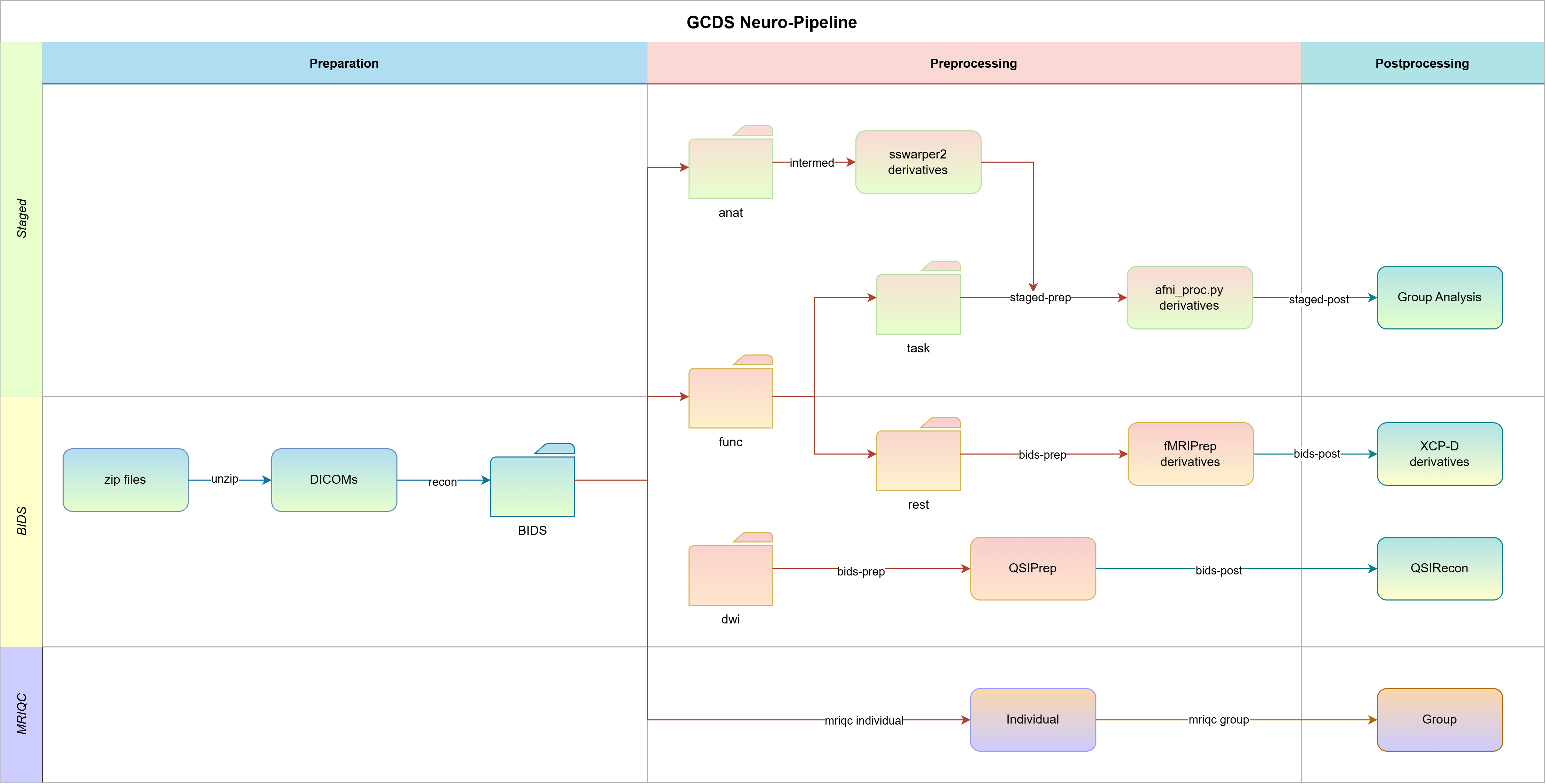
1. Configure
Run neuropipe init once to create a config directory with template files:
neuropipe init /scratch/my_studyThen edit the two per-project files inside the generated config directory:
project_config/{project}_config.yaml— HPC module names, container paths, and task parameters (e.g.blur_size,remove_TRs).results_check/{project}_checks.yaml— expected output files per task, used by--resumeandcheck-outputsto determine which subjects are complete.
hpc_config.yaml and config.yaml at the root of the config directory are cluster-wide and shared across all projects; set them up once when deploying on a new cluster.
See Project Config Guide and Output Checks Config. For the shared configs, see HPC Config and Pipeline Config.
2. Detect subjects
neuropipe detect-subjects /data/raw --prefix "sub-" --output subjects.txtThis scans a directory for subject folders and writes bare IDs (prefix stripped) to a file, e.g. sub-001 → 001. Pass these to --subjects subjects.txt in all subsequent commands. The pipeline re-applies the prefix internally using the prefix field in your project config, so each script receives $PREFIX and $SUBJECT_ID separately and constructs the full ID (sub-001, 001, etc.) itself.
If your data has no prefix (folders named 001, 002, ...), use --prefix "" here and set prefix: "" in your project config.
See CLI Reference.
3. Dry-run
Before submitting to the cluster, run with --dry-run to validate your config, generate wrapper scripts, and print the full SLURM submission plan, without queuing anything.
neuropipe run \
  --subjects subjects.txt \
  --input /data/raw --output /data/processed --work /data/work \
  --config-dir /scratch/my_study/config \
  --project my_study --session 01 \
  --prep unzip_recon \
  --intermed volume \
  --bids-prep rest,dwi --bids-post rest,dwi \
  --staged-prep cards,kidvid \
  --mriqc all \
  --dry-run
The --session flag sets the session/wave label; it is passed as $SESSION to every wrapper script and used as a path component when locating inputs and outputs. For longitudinal studies, re-run with --session 02, --session 03, etc.
Check the printed DAG execution plan to verify task order and dependencies before anything hits the cluster (Pipeline Reference). The wrapper scripts written to {work_dir}/log/wrapper/ show the exact module loads, exported environment variables, and script call for each job. Preflight errors (misconfigured modules, missing profile names, unknown task references) are caught here and block submission.
4. Submit
Remove --dry-run. Preflight and BIDS validation run again automatically.
neuropipe run \
  --subjects subjects.txt \
  --input /data/raw --output /data/processed --work /data/work \
  --config-dir /scratch/my_study/config \
  --project my_study --session 01 \
  --prep unzip_recon \
  --intermed volume \
  --bids-prep rest,dwi --bids-post rest,dwi \
  --staged-prep cards,kidvid \
  --mriqc all
Each task is submitted as a SLURM array job (one element per subject). Downstream jobs are held with --dependency=afterany until all upstream jobs finish. Individual subject failures don’t cancel other subjects’ downstream work.
Submitting in stages. You don’t need to submit everything at once. For initial validation, go stage by stage: submit --prep unzip_recon, verify the BIDS output, then submit --intermed/--bids-prep, and so on. Once the pipeline is stable for your dataset, you can submit all stages in a single command.
--wait blocks the terminal and polls until all submitted jobs finish. Only useful in automated scripts; for interactive use you don’t need it.
See Pipeline Reference for per-task details (inputs, outputs, SLURM profiles).
5. Merge logs
Compute nodes write JSONL event logs in real time. Once jobs finish, merge them into the SQLite database:
neuropipe merge-logs /data/work/my_studyThis is required before generate-report can show job durations and status. The database is backed up automatically before each merge. check-outputs checks the filesystem directly and does not need the database.
If the database is missing records after a cluster crash, use force-rebuild to reconstruct it from all JSONL logs including archived ones:
neuropipe force-rebuild /data/work/my_studySee Logging System for how merging works.
6. Verify outputs
Check that all expected output files exist for every subject:
neuropipe check-outputs \
  --project my_study --work /data/processed \
  --config-dir /scratch/my_study/config \
  --subjects subjects.txt --session 01
Prints a terminal summary and saves a full CSV to {work_dir}/check_results_{timestamp}.csv. Then generate an HTML report combining job status and output check results:
neuropipe generate-report \
  --db-path /data/work/my_study/database/pipeline_jobs.db \
  --project my_study --session 01
See Post-run Verification and Output Checks Config.
7. Re-run failed subjects
Use --resume to skip subjects whose outputs already pass the output checks and resubmit only the rest:
neuropipe run \
  --subjects subjects.txt \
  --input /data/processed --output /data/processed --work /data/work \
  --config-dir /scratch/my_study/config \
  --project my_study --session 01 \
  --intermed volume \
  --resume
The pipeline prints which subjects are being skipped and which are being resubmitted. See Rerunning Subjects.