This page explains how the pipeline works end-to-end: what the CLI flags do, how tasks are connected, and what actually happens on the cluster when you press enter.
Two kinds of settings¶
Before diving into tasks, it helps to understand where things are configured:
CLI flags: decide which tasks to run and in what order. These are the
--prep,--intermed,--bids-prep, etc. flags you pass toneuropipe run. They do not contain paths or tool parameters.Config files: supply all the actual values: cluster paths, container filenames, module names, tool parameters (e.g.
remove_TRs,blur_size). These live inconfig/project_config/{project}_config.yaml.
In other words: the CLI selects tasks; the config files configure them. If a task produces wrong results, check the config. If a task doesn’t run at all, check the CLI flags.
CLI Flags Overview¶
| Flag | Tasks triggered | Dependency behavior |
|---|---|---|
--prep unzip | unzip | No dependencies; runs immediately |
--prep recon | recon | No dependencies; assumes raw data is already extracted |
--prep unzip_recon | unzip → recon | Sequential: recon waits for unzip to complete |
--intermed volume,bfc,... | one task per name given | Each task waits for recon; multiple intermed tasks run in parallel with each other |
--bids-prep rest,dwi | one prep task per name given | Waits for recon; not affected by --intermed; rest and dwi prep run in parallel |
--bids-post rest,dwi | one post task per name given | Each post task waits for its own -prep counterpart; rest_post and dwi_post run in parallel |
--staged-prep task1,task2,... | one prep task per name given | Waits for all requested intermed tasks; multiple staged tasks run in parallel with each other; if no --intermed, waits for recon instead |
--staged-post task1,... | one post task per name given | Each post task waits for its own -prep counterpart; task1 and task2 run in parallel |
--mriqc individual | mriqc_preprocess | Waits for recon; array job, one per subject |
--mriqc group | mriqc_post | Waits for mriqc_preprocess if also requested; otherwise no dependencies |
--mriqc all | mriqc_preprocess → mriqc_post | Sequential: group report waits for all individual jobs |
Multiple flags can be combined freely in one command. The pipeline resolves all dependencies automatically.
Automatic BIDS Validation¶
Before any jobs are submitted, the pipeline automatically validates your BIDS dataset when you use --bids-prep or --mriqc individual / --mriqc all. Validation checks that your BIDS directory conforms to the BIDS specification. Missing files, incorrect naming, or malformed metadata will be caught here before any cluster resources are used.
| Flag | BIDS validation runs? |
|---|---|
--prep | No |
--intermed | No |
--bids-prep rest or --bids-prep dwi | Yes |
--bids-post (without --bids-prep) | No |
--staged-prep / --staged-post | No |
--mriqc individual or --mriqc all | Yes |
--mriqc group (without individual) | No |
To skip validation (e.g. if you have already validated or the BIDS checker is slow on your filesystem):
neuropipe run ... --skip-bids-validationPre-flight Checks¶
Before any jobs are submitted, the pipeline automatically validates your project configuration against the global pipeline config. This catches misconfiguration early, before any cluster resources are used.
The following are checked:
| Category | What is checked |
|---|---|
schema | Required top-level keys present in project config: prefix, scripts_dir, envir_dir, database, tasks |
schema | envir_dir.container_dir is defined |
schema | database.db_path is defined |
schema | Each task name under tasks: exists in global config.yaml |
schema | Each task’s resource profile exists in hpc_config.yaml |
schema | Each environ module listed under a task is defined in modules: in the project config |
Issues are reported as ERROR (blocks submission) or warning (informational). If any errors are found, the run exits before submitting any jobs.
[preflight] 1 error(s), 0 warning(s) found

  [schema]
    ERROR  : task 'volume': environ entry 'afni_24.3.06' is not defined in project config modules

[preflight] 1 error(s) must be resolved before jobs can be submitted.
            Re-run with --skip-preflight to bypass these checks.
To bypass preflight (e.g. during development or if you have already verified the config):
neuropipe run ... --skip-preflightResume: Skip Completed Subjects¶
The --resume flag tells the pipeline to skip subjects whose task outputs already exist on disk. This is useful when re-running a partially completed pipeline; only subjects with missing outputs will be submitted.
neuropipe run ... --resumeSee Output Checks Configuration for how resume works, the checks config syntax, scope rules, what happens when a task is not configured, and the check-outputs standalone command.
How the DAG works¶
Step 1: Build the task list¶
When you run neuropipe run, the pipeline reads your flags and builds a list of tasks to execute. For example, --prep unzip_recon --intermed volume --bids-prep rest --staged-prep cards produces:
[unzip, recon, volume, rest_preprocess, cards_preprocess]Step 2: Resolve dependencies¶
The pipeline applies a fixed set of dependency rules to wire tasks together:
Rule 1 — prep sequence: --prep unzip_recon submits both tasks with recon depending on unzip. --prep unzip and --prep recon each submit only one task with no inter-task dependency.
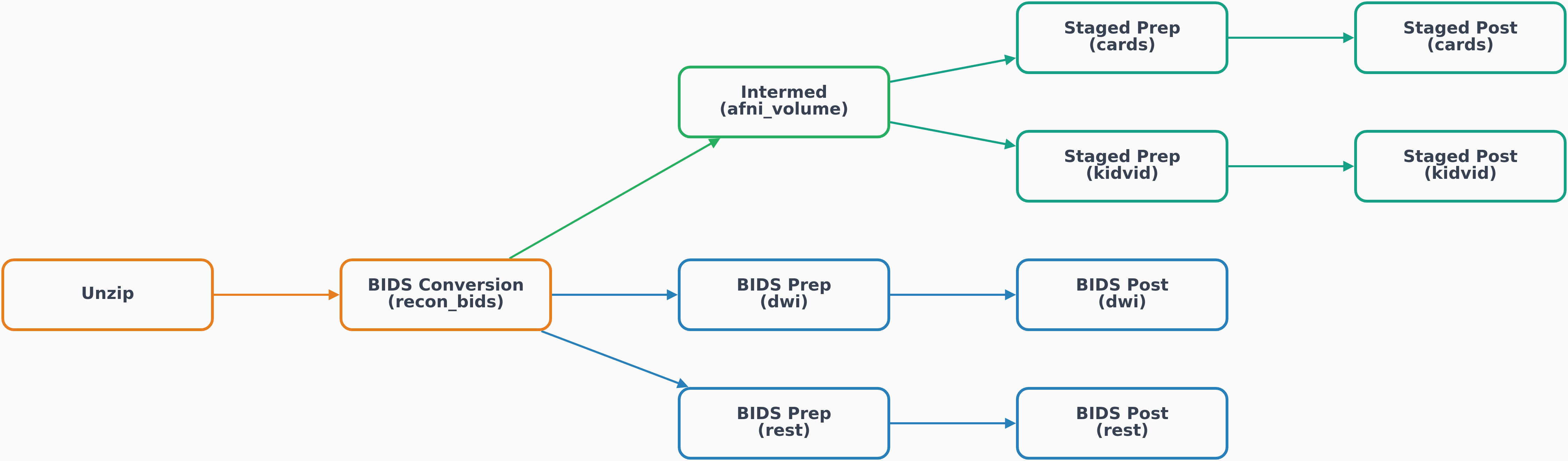
Rule 2 — recon is the hub: Every downstream task (except staged ones) depends on recon. This means volume, rest_preprocess, dwi_preprocess, and mriqc_preprocess all wait for BIDS conversion to complete.
Rule 3 — intermed tasks run in parallel: Multiple intermed tasks (e.g. volume and bfc) both depend on recon but not on each other. They are submitted simultaneously and run on the cluster at the same time.
Rule 4 — staged tasks wait for ALL intermed: A staged task (marked multi_stage: true in config.yaml) waits for every intermed task you requested. If you run --intermed volume,bfc --staged-prep cards, then cards_preprocess only starts after both volume and bfc have finished (in any state, including failed). If you omit --intermed, staged tasks depend directly on recon instead.
Rule 5 — post follows prep within a section: rest_post waits for rest_preprocess. mriqc_post waits for mriqc_preprocess. This is automatic; you don’t need to specify the order.
Rule 6 — BIDS and MRIQC pipelines are not affected by intermed: rest_preprocess, dwi_preprocess, and mriqc_preprocess always depend only on recon, regardless of whether you also requested --intermed.
Step 3: Print the execution plan¶
Before any job is submitted, the resolved plan is printed so you can verify it:
DAG execution plan:
  unzip            <- (no dependencies)
  recon       <- unzip
  volume           <- recon
  rest_preprocess  <- recon
  rest_post        <- rest_preprocess
  cards_preprocess <- volume
If the plan looks wrong (e.g. a task is missing, or dependencies are not what you expected), stop here and check your flags before anything is submitted to the cluster.
Step 4: Submit jobs in order¶
See Complete Pipeline Walkthrough, § 4. Submit, for submission behaviour, array job details, dependency chaining, and guidance on submitting in stages.
Step 5: What each submitted job does¶
Each task is submitted as a wrapper script that the pipeline generates automatically and saves to {work_dir}/log/wrapper/. The wrapper:
Exports all paths (
$INPUT_DIR,$OUTPUT_DIR,$WORK_DIR,$CONTAINER_DIR, ...)Exports all
envir_dirvalues from your project config as$UPPERCASEvariablesExports all task parameters from your project config as
$UPPERCASEvariables (e.g.$REMOVE_TRS,$BLUR_SIZE)Runs the HPC module load commands from
modulesin your project configCalls your analysis shell script, passing the subject ID as
$1for array jobs
So when you set blur_size: 4.0 in your project config, that value travels through:
project_config.yaml → wrapper script (export BLUR_SIZE="4.0") → your .sh script ($BLUR_SIZE)You never need to hard-code paths or parameters inside your analysis scripts.
For the full picture of how wrapper scripts are generated, what they contain, and how SLURM array jobs and dependency chains are structured, see Wrapper Scripts & SLURM Submission.
Full DAG (all flags active)¶
Task-by-task pages¶
Each page below documents the tasks for one CLI flag group: what each task does, its SLURM profile, inputs/outputs, and the project config fields it uses.
Output directory layout¶
output_directory/
├── raw/                        # unzip output
├── BIDS/                       # recon output
├── AFNI_derivatives/           # volume, cards_preprocess, kidvid_preprocess output
├── BIDS_derivatives/
│   ├── fmriprep/               # rest_preprocess output
│   ├── xcpd/                   # rest_post output
│   ├── qsiprep/                # dwi_preprocess output
│   └── qsirecon/               # dwi_post output
└── quality_control/
    └── mriqc/                  # mriqc_preprocess and mriqc_post output

work_directory/
├── database/
│   └── pipeline_jobs.db        # job tracking database (all submissions logged here)
└── log/
    ├── wrapper/                 # auto-generated SLURM wrapper scripts (one per submission)
    ├── recon/              # SLURM .out and .err logs per task
    ├── volume/
    ├── rest_preprocess/
    └── ...
The log/wrapper/ directory is useful for debugging: each wrapper script contains the exact sbatch command that was run, all exported environment variables, and the analysis script that was called.